
Notion vs Evernote (2026): Ultimate Productivity Comparison Guide
Notion and Evernote are two of the most popular productivity tools, but they serve slightly different purposes. Evernote is mainly focused on fast and simple note-taking, helping users quickly capture ideas, save web pages, and organize information with minimal setup. Notion, on the other hand, is a more flexible all-in-one workspace where you can build databases, manage projects, and design your own productivity system. While Evernote prioritizes simplicity and speed, Notion focuses on customization and scalability. Choosing between them depends on whether you want a ready-to-use note app or a fully customizable digital workspace for work and personal organization needs.
Key Differences Overview
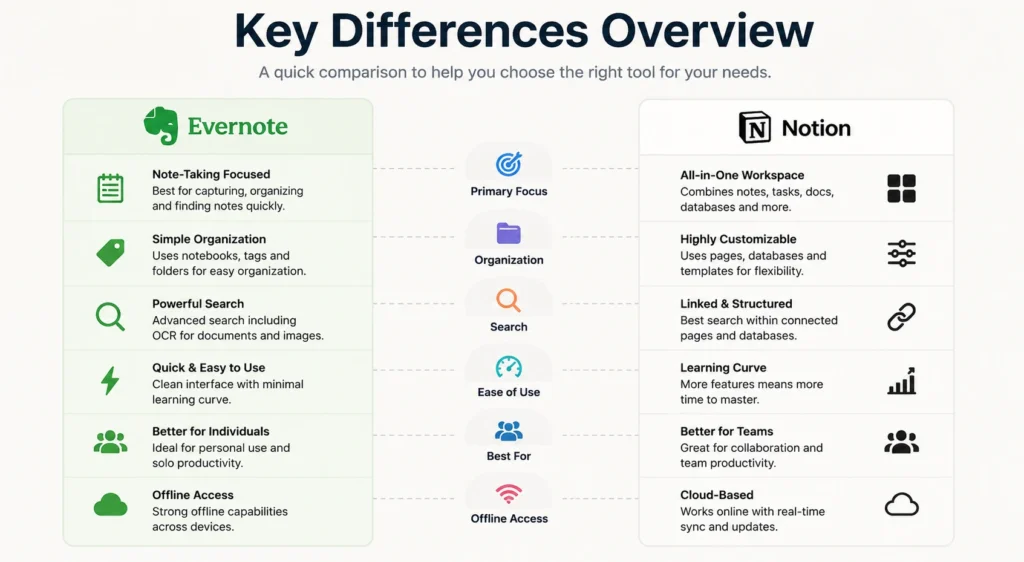
The main difference between Notion and Evernote comes down to structure versus simplicity. Evernote is designed for users who want a straightforward note-taking experience without much setup or a learning curve. It excels in capturing ideas quickly and retrieving them through powerful search tools. Notion, however, is built for users who want to create structured systems, combining notes, tasks, and databases in one place. It offers far more flexibility but requires more time to learn. In short, Evernote is optimized for speed and ease, while Notion is built for customization, collaboration, and long-term productivity systems.
💚 You might also like: Startup vs Freelancing: Which Career Path is Better in 2026?
Evernote Overview
Evernote is one of the earliest and most established note-taking apps, widely used for capturing ideas, organizing notes, and managing personal information. It focuses on simplicity and efficiency, making it easy for users to store text, images, audio, and web clippings in one place. Over the years, Evernote has improved its interface and performance under new management, aiming to stay competitive in a crowded productivity market. Its strength lies in its reliability and structured note system, which appeals to users who prefer a traditional, distraction-free approach to digital note-taking without complex setup or customization requirements.
Core Strengths for Note-Taking
Evernote’s biggest strength is its ability to capture and organize notes quickly and efficiently. Users can save text, images, PDFs, and web pages instantly, making it ideal for research, studying, and everyday note-taking. Its powerful search feature allows users to find information inside documents, even scanned text, which saves time. The app also supports notebooks and tags, helping users keep everything structured. This makes Evernote especially useful for people who want a reliable, fast, and organized system for storing information without needing advanced setup or technical customization like other modern productivity tools require.
Ease of Use for Beginners
Evernote is widely known for being beginner-friendly because it has a clean and simple interface. New users can start taking notes immediately without learning complex systems or workflows. The layout is straightforward, with notebooks and notes clearly organized for easy navigation. Unlike more advanced tools, Evernote does not overwhelm users with too many customization options. This makes it a great choice for students, professionals, or anyone who just wants a simple digital notebook. Its minimal learning curve allows users to focus on writing and organizing ideas rather than spending time configuring the app.
Search and Organization Capabilities
Evernote offers one of the strongest search systems in the note-taking industry. Users can search through text, PDFs, images, and even handwritten notes, making it extremely powerful for retrieving information quickly. Its organization system is based on notebooks and tags, which helps users categorize and filter content efficiently. While it is not as flexible as newer tools, it provides a stable and predictable structure that works well for long-term note storage. This makes Evernote ideal for users who prioritize fast information retrieval and simple, reliable organization over complex customization options or advanced workspace design.
Notion Overview
Notion is a modern all-in-one productivity platform designed to replace multiple apps by combining notes, tasks, databases, and collaboration tools in one workspace. Unlike traditional note-taking apps, Notion allows users to build fully customized systems for work, study, and personal organization. It has gained massive popularity among startups, students, and remote teams due to its flexibility and scalability. According to Notion’s official usage data and productivity research shared by tools like Zapier, it is widely used for project management and knowledge bases. Its strength lies in adaptability, letting users design workflows exactly the way they want instead of following a fixed structure.
Flexible Productivity System
Notion’s biggest advantage is its flexibility, allowing users to create pages, databases, calendars, and boards within a single workspace. You are not limited to simple notes; you can build entire project management systems, content calendars, or CRM tools. This makes it ideal for people who want complete control over their workflow. However, this flexibility comes with a learning curve, as beginners may need time to understand how to structure their workspace effectively. Once mastered, Notion becomes a powerful productivity hub that can replace multiple apps and adapt to both personal and professional use cases.
Team Collaboration Features
Notion is widely recognized for its strong collaboration capabilities, especially for remote teams and startups. Multiple users can edit pages in real time, leave comments, assign tasks, and share workspaces seamlessly. It also supports role-based permissions, making it suitable for both small teams and large organizations. Many companies use Notion as a central knowledge base where documentation, project plans, and meeting notes are stored. This makes collaboration more transparent and organized compared to traditional note apps, positioning Notion as a powerful tool for modern digital teamwork and project coordination.
AI and Advanced Capabilities
Notion has introduced AI features that enhance productivity by helping users summarize notes, generate content, and automate writing tasks. These AI tools are integrated directly into the workspace, making it easier to manage large amounts of information efficiently. Beyond AI, Notion also supports advanced databases, formulas, and integrations that allow users to build highly customized workflows. This level of functionality is one reason why Notion is considered more than just a note-taking app; it is a full productivity system designed for users who need advanced control, automation, and structured organization in their daily work.
Note-Taking Experience Comparison
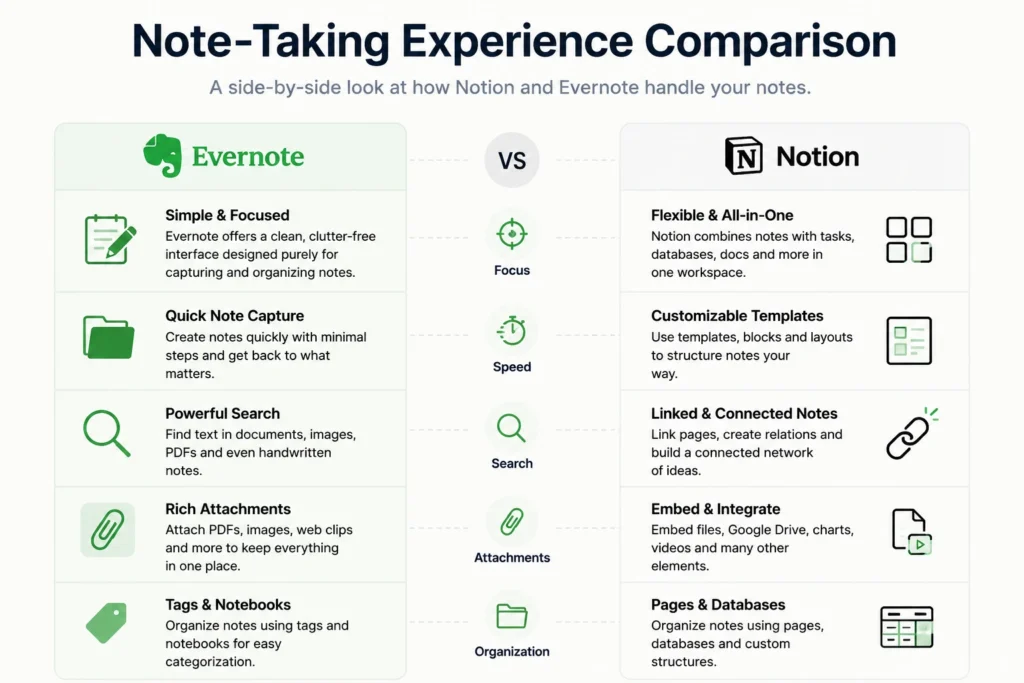
When comparing note-taking experiences, Evernote focuses on speed and simplicity, while Notion emphasizes structure and customization. Evernote is ideal for quickly capturing ideas, saving articles, and organizing information in a straightforward format. Notion, however, allows users to create interconnected notes using databases, links, and templates. This makes it more powerful for long-term knowledge management but slightly slower for quick note capture. According to productivity studies highlighted by tools like Zapier, users who prefer instant writing often lean toward Evernote, while those who want structured systems and deeper organization prefer Notion for building a personal knowledge base.
💚 You might also like: ChatGPT vs Gemini vs Claude 2026 – Which AI Is Best?
Productivity and Workflow Management
In terms of productivity and workflow management, Notion clearly stands out as a more advanced solution. It allows users to build full project management systems with tasks, timelines, calendars, and dashboards in a single workspace. Evernote, on the other hand, is more focused on simple to-do lists and basic task organization. While Evernote is effective for personal productivity and lightweight planning, it lacks the depth required for complex workflows. Notion’s ability to combine notes and project management makes it a preferred choice for teams, freelancers, and professionals managing multiple projects at once.
Ease of Use and Learning Curve
Evernote is significantly easier to use compared to Notion because it follows a traditional note-taking structure with minimal setup required. Users can start writing immediately without learning advanced features. Notion, however, has a steeper learning curve due to its modular system of pages, blocks, and databases. While this complexity provides more power and flexibility, it can be overwhelming for beginners. Over time, users who invest in learning Notion often find it more rewarding, but Evernote remains the better choice for those who prioritize simplicity, speed, and immediate usability without technical learning.
Search, Organization, and Knowledge Management
Evernote is known for its powerful search functionality, allowing users to find text inside notes, PDFs, and even images using OCR technology. This makes it extremely efficient for retrieving stored information quickly. Notion, while improving its search features, relies more on structured organization through databases, links, and tags. This makes Notion better for building interconnected knowledge systems but slightly less efficient for instant retrieval. Evernote’s traditional folder-based system is easier to navigate, while Notion offers a more dynamic but complex approach to organizing large volumes of information.
Pricing and Value Analysis
Pricing plays an important role when choosing between Notion and Evernote, especially for students, freelancers, and small teams. Evernote offers a simple tier system, but its free plan is quite limited in terms of device syncing and storage. Paid plans unlock more features like offline access and increased upload limits. Notion, on the other hand, is widely known for its generous free plan, which includes unlimited pages and blocks for personal use. According to productivity platform comparisons shared by tools like Zapier and industry reviews, Notion provides better overall value for individuals, while Evernote focuses more on premium note-taking stability.
Integrations and Ecosystem (Zapier & Beyond)
Both Notion and Evernote support integrations, but Notion has a more modern and expanding ecosystem. Through tools like Zapier, Notion can connect with hundreds of apps such as Google Drive, Slack, Trello, and automation platforms, making it highly adaptable for workflow automation. Evernote also integrates with popular tools, but its ecosystem is more limited and traditional. Notion’s open structure allows users to build custom workflows across multiple platforms, which is why startups and digital teams often prefer it. Evernote remains reliable for basic integrations, but it does not match Notion’s flexibility in building a connected productivity system.
Conclusion
Both Notion and Evernote are powerful productivity tools, but they serve different needs. Evernote is best for users who want fast, simple, and reliable note-taking without complexity. Notion is better for users who want a fully customizable workspace for managing notes, projects, and team collaboration. In 2026, Notion leads in flexibility and features, while Evernote still wins in simplicity and ease of use. The right choice depends on whether you prefer a lightweight note app or a complete productivity system built around your workflow.
FAQs
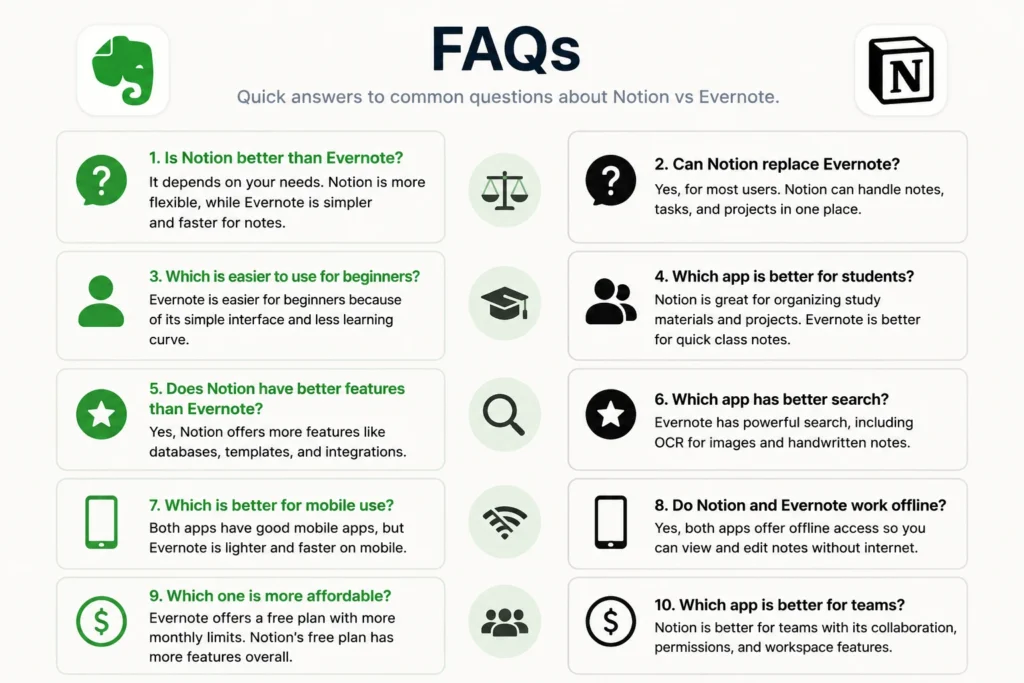
Is Notion better than Evernote?
Notion is better for customization and productivity systems, while Evernote is better for simple note-taking.
Can Notion replace Evernote?
Yes, but only if you need advanced workflows; otherwise, Evernote is simpler and faster for basic notes.
Which is easier to use for beginners?
Evernote is easier because it has a simple interface with minimal setup and learning required.
Which app is better for students?
Evernote is great for quick notes, but Notion is better for organized study systems and planning.
Does Notion have better features than Evernote?
Yes, Notion offers more features like databases, AI tools, and project management capabilities.
Tech made simple, follow Tech Baaz for more.