
How to Build a Website Step-by-Step (2026 Beginner Guide)
Building a website in 2026 is no longer a technical challenge reserved for developers. Today, anyone can create a professional, high-performing website using modern tools and platforms. Whether you are starting a business, building a personal brand, or launching an online store, a website acts as your digital identity. In this guide, we will walk through each step in a simple, practical way. You will learn how to choose platforms, set up hosting, design pages, and optimize for SEO so your website can attract visitors and grow online effectively. Step-by-step approach keeps it very easy.
Why You Need a Website in 2026
A website in 2026 is essential for building trust, visibility, and long-term growth. Social media alone is not enough because algorithms change constantly. A website gives you full control over your brand, content, and audience experience. It also helps you appear on Google search, attract organic traffic, and convert visitors into customers more effectively than any single platform online today.
Choosing the Right Website Platform
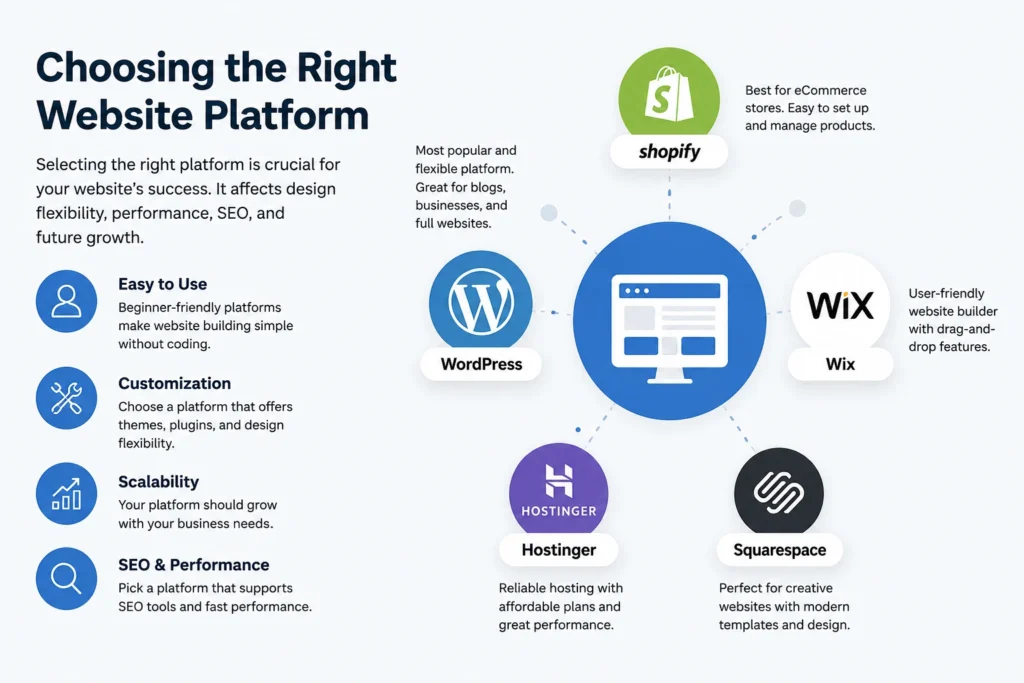
Choosing the right website platform is one of the most important decisions when building a website. It affects your design flexibility, SEO performance, speed, and long-term scalability. Beginners often prefer user-friendly platforms like WordPress, Wix, or Shopify because they require no coding. WordPress remains the most popular choice globally due to its flexibility and plugin ecosystem. However, each platform has strengths depending on your goals. If you want a blog, store, or business site, selecting the right platform ensures easier management, better performance, and stronger growth potential over time, which supports long-term online success.
💚 You might also like: Notion vs Evernote (2026): Ultimate Productivity Comparison Guide
Domain Name and Hosting Setup
Your domain name and hosting setup form the foundation of your website. A domain is your website address, while hosting is where your site lives online. Choosing a memorable, brandable domain helps users find and trust your website easily. Meanwhile, reliable hosting ensures fast loading speed, security, and uptime. Many beginners make the mistake of choosing cheap hosting, which can affect performance. Understanding both elements is essential before building your website. A strong setup improves SEO rankings, user experience, and long-term website stability across all devices and locations, which ensures a reliable online presence is always stable.
How to Choose a Strong Domain Name
A strong domain name should be short, easy to remember, and relevant to your brand or business. Avoid using complex words, numbers, or hyphens that confuse users. A .com extension is usually preferred for global trust. Always check availability and avoid copyright issues. A good domain helps improve branding, SEO visibility, and user trust from the beginning of the website journey.
Understanding Web Hosting Types
Web hosting comes in different types, including shared hosting, VPS hosting, cloud hosting, and dedicated servers. Shared hosting is budget-friendly but slower, while VPS offers better performance and control. Cloud hosting is scalable and reliable for growing websites. Dedicated servers provide maximum power for large businesses. Choosing the right hosting type depends on your budget, traffic, and technical requirements overall.
Planning Your Website Structure
Planning your website structure is a crucial step before design or development begins. It helps you organize pages, improve user navigation, and enhance SEO performance. A well-planned structure ensures that visitors can easily find information without confusion. Most successful websites use a clear hierarchy, including a homepage, service pages, a blog, and a contact section. Creating a sitemap before building reduces mistakes and saves time later. Good structure also helps search engines understand your content better, improving your chances of ranking higher in search results and increasing organic traffic over time, which boosts overall website authority and great results.
Creating a Sitemap and Page Plan
A sitemap is a blueprint of your website that shows all pages and how they connect. It helps both users and search engines navigate your site easily. A good page plan includes essential pages like home, about, services, blog, and contact. Planning structure before development avoids confusion, improves SEO, and ensures a smooth user experience from the start always better.
Designing Your Website
Website design plays a major role in how users perceive your brand and interact with your content. A clean, modern, and user-friendly design helps build trust and keeps visitors engaged longer. In 2026, mobile-first and responsive design are essential because most traffic comes from smartphones. Choose a theme or template that matches your niche and keeps navigation simple. Avoid cluttered layouts and too many colors. Good design is not just about looks it directly impacts user experience, SEO rankings, and conversion rates, making it a critical step in website success and long-term online growth today.
Building Your Website Step-by-Step
Building a website becomes simple when you follow a structured process. First, install your chosen platform, such as WordPress or a website builder. Next, set up your theme and adjust basic settings like site title and logo. After that, create essential pages like Home, About, Services, and Contact. Add navigation menus so users can easily explore your site. Install necessary plugins for SEO, security, and performance. Each step builds the foundation of a functional website. Following a step-by-step method reduces errors, saves time, and ensures your website is ready for both users and search engines properly.
Installing Your Platform (WordPress or Website Builder)
Installing your platform is the first technical step in building a website. WordPress requires hosting installation, while platforms like Wix or Shopify offer built-in setup. After installation, you configure basic settings such as site name, language, and theme selection. This step prepares your website environment and ensures everything is ready for designing and adding content smoothly without technical confusion or delays later.
Creating Pages and Basic Setup
Creating pages is essential for organizing your website content properly. Start with core pages like Home, About, Services, Blog, and Contact. Each page should have a clear purpose and simple structure. Add navigation menus to connect all pages for easy browsing. A proper setup improves user experience, helps SEO indexing, and ensures visitors can quickly find the information they need efficiently.
Creating High-Quality Website Content
High-quality content is the backbone of any successful website. Without valuable content, even the best design or SEO cannot bring long-term results. Your content should be clear, engaging, and written for real users, not just search engines. Focus on solving user problems and answering their questions directly. Use simple language, short paragraphs, and a natural tone to improve readability. Add relevant images, examples, and structured formatting to make content more engaging. Well-written content increases trust, reduces bounce rate, and improves your chances of ranking higher on Google consistently over time with strong authority-building results.
Writing SEO-Friendly Content for Pages
SEO-friendly content means writing in a way that helps both users and search engines understand your page. Use primary keywords naturally, write clear headings, and provide useful information. Avoid keyword stuffing and focus on intent-based writing. Each page should clearly respond to a specific user search intent. Good SEO content improves rankings, drives organic traffic, and increases engagement across your website effectively.
SEO Optimization for Your Website
SEO optimization is essential for making your website visible on Google and other search engines. Without SEO, even a well-designed website may not get traffic. Start with on-page SEO elements like titles, meta descriptions, headings, and URLs. Include relevant keywords in a natural way throughout your content. Internal linking helps connect pages and improves crawlability. Optimizing images and improving page speed also boosts rankings. A strong SEO foundation ensures long-term organic growth. According to multiple SEO studies, websites on the first page of Google receive over 90% of total search traffic, making optimization a must for success.
Basic On-Page SEO Setup
On-page SEO includes optimizing elements within your website pages. This involves using proper title tags, meta descriptions, headers, and keyword placement. Each page should target a specific keyword and provide valuable content around it. Clean URLs and structured headings improve readability and indexing. On-page SEO helps search engines understand your content and increases your chances of ranking higher in search results consistently.
Website Speed and Performance Optimization
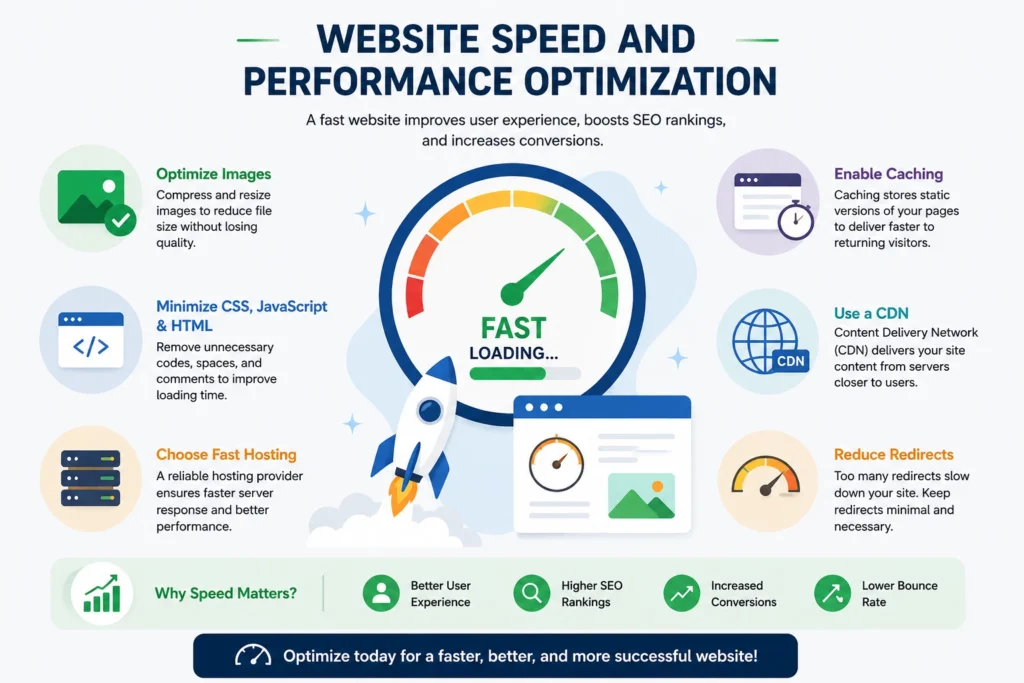
Website speed is one of the most important ranking and user experience factors in 2026. A slow website increases bounce rate and reduces conversions, even if your content is high quality. Google research shows that users are more likely to leave if a page takes more than 3 seconds to load. To improve performance, optimize images, reduce unnecessary scripts, and use caching tools. Choosing a fast hosting provider also makes a big difference. A well-optimized website loads quickly across all devices, improves SEO rankings, and keeps visitors engaged longer, leading to better overall business results online consistently.
💚 You might also like: Startup vs Freelancing: Which Career Path is Better in 2026?
Launching and Maintaining Your Website
Launching a website is not the final step; it is the beginning of ongoing improvement. Before going live, you should test all pages, fix broken links, and ensure mobile responsiveness. After launch, promote your website using social media, SEO, and email marketing. Regular maintenance is equally important, including updating plugins, improving content, and monitoring performance. Websites that are actively maintained tend to rank higher and perform better over time. Consistent updates signal trust and authority to search engines, helping your website grow steadily in traffic, visibility, and conversions across competitive online markets globally today.
Pre-Launch Checklist and Post-Launch Updates
A pre-launch checklist ensures your website is ready for users. It includes checking mobile responsiveness, fixing errors, testing forms, and reviewing content. After launch, updates should be done regularly, including adding new content, improving SEO, and fixing technical issues. Continuous improvements keep your website secure, fast, and relevant. This helps maintain strong performance and better search engine rankings over time consistently.
Conclusion
Building a website step by step is no longer a complex task if you follow the right process. From choosing a platform and domain to designing, optimizing, and launching, every step plays a key role in your online success. A well-structured website not only improves user experience but also helps you rank on Google and grow your brand. Consistency, regular updates, and SEO optimization are what turn a simple website into a powerful digital asset that generates traffic, leads, and long-term business growth effectively.
FAQs
How long does it take to build a website?
It usually takes 1–7 days, depending on complexity and experience level.
Do I need coding skills to build a website?
No, modern platforms allow you to build websites without any coding knowledge.
What is the best platform for beginners?
WordPress and Wix are the most beginner-friendly and widely used platforms.
How much does it cost to build a website?
A basic website can cost $50–$300 yearly, including domain and hosting.
Can I make my website rank on Google?
Yes, with proper SEO, quality content, and consistent optimization strategies.
What pages should every website include?
Every website should have Home, About, Services, Blog, and Contact pages.
How do I improve website speed?
Optimize images, use caching, and choose a fast and reliable hosting provider.
Tech made simple, follow Tech Baaz for more.